If you’re serious about DeckLink SDI calibration, here’s an uncomfortable truth: the patch you’re measuring might not be traveling the road you think it is.
A monitor plugged in as a macOS display and the same monitor fed by SDI from Blackmagic hardware are two different signal paths, even when both cables come out of the same Mac. One goes through macOS ColorSync and display profile machinery. The other doesn’t. If you’re characterizing the SDI path, calibrating through the macOS path is like tuning a car engine by listening to a recording of it.
That’s the gap PatternSpace 2.0 closes. I covered PatternSpace before as a macOS pattern generator for display calibration, and the 2.0 update adds DeckLink SDI output: an SDI pattern generator for Mac that drives SDR calibration patches through DeckLink and UltraStudio hardware, while ColourSpace controls the patch sequence over the network. The full technical reference is in the DeckLink SDI guide.
Why calibrate over SDI instead of a Mac display window?
Because a display window takes the scenic route, and the scenery is ColorSync.
When a patch renders in a fullscreen window on a Mac display, the pixels pass through macOS color management — display profiles, EDR tone mapping, the whole parade. That’s correct when you’re calibrating that display as a Mac display. It’s wrong when the thing under test is the SDI chain: the Blackmagic output, the cables, the monitor’s SDI input processing.
With DeckLink SDI output, patch frames travel the hardware video-output path instead of a macOS display window. Your meter measures the monitor, ColourSpace collects the readings, and PatternSpace does exactly one job: presenting patches. It doesn’t measure the display and doesn’t generate corrections — the signal generator and the measuring instrument stay in their lanes.
DeckLink SDI output specs: the full contract
This is SDR-only, and refreshingly specific about it:
- 720p: 50, 59.94, 60 fps
- 1080p: 23.98, 24, 25, 29.97, 30, 50, 59.94, 60 fps
- Signal: 10-bit YCbCr 4:2:2, packed as v210
- Range and colorimetry: Video (Legal) range, BT.709, gamma 2.4
- Driver: Blackmagic Desktop Video 16.4.x
- Content: solid colors and rectangle calibration patches, plus black for stopping output
Not in 2.0’s SDI output: HDR, UHD, RGB/12-bit output, and library patterns. Request a library pattern while SDI is selected and it’s rejected outright — never silently redirected to a Mac display. A calibration tool that fails loudly beats one that fails politely.
PatternSpace Pro vs DeckLink SDI Output: what each purchase unlocks
The money part, up front, because it’s slightly unusual. DeckLink SDI Output is a separate $39.99 one-time purchase, independent of PatternSpace Pro ($39.99). ColourSpace, CalMAN, and PGenerator automation live in Pro — so a ColourSpace-driven SDI calibration workflow needs both purchases. Buying SDI alone doesn’t unlock Pro; buying Pro alone doesn’t unlock SDI.
Annoying? A little. Dishonest? No — it’s stated plainly instead of being buried three dialogs deep. One-time purchases, no subscription, Family Sharing included. You’ll also need the obvious separate gear: Blackmagic hardware, Desktop Video, a measurement instrument, and calibration software. PatternSpace is the SDI patch generator, not the whole lab.
How to set up DeckLink SDI output with ColourSpace
Once your hardware is connected, the DeckLink SDI calibration workflow itself is straightforward:
- Prepare the video path. Install Blackmagic Desktop Video 16.4.x and confirm the device appears in Desktop Video Setup. Connect its SDI output to the monitor and select the matching monitor input.
- Unlock the features. Purchase or restore DeckLink SDI Output under Output Display in PatternSpace. Add PatternSpace Pro too if ColourSpace will drive the sequence.
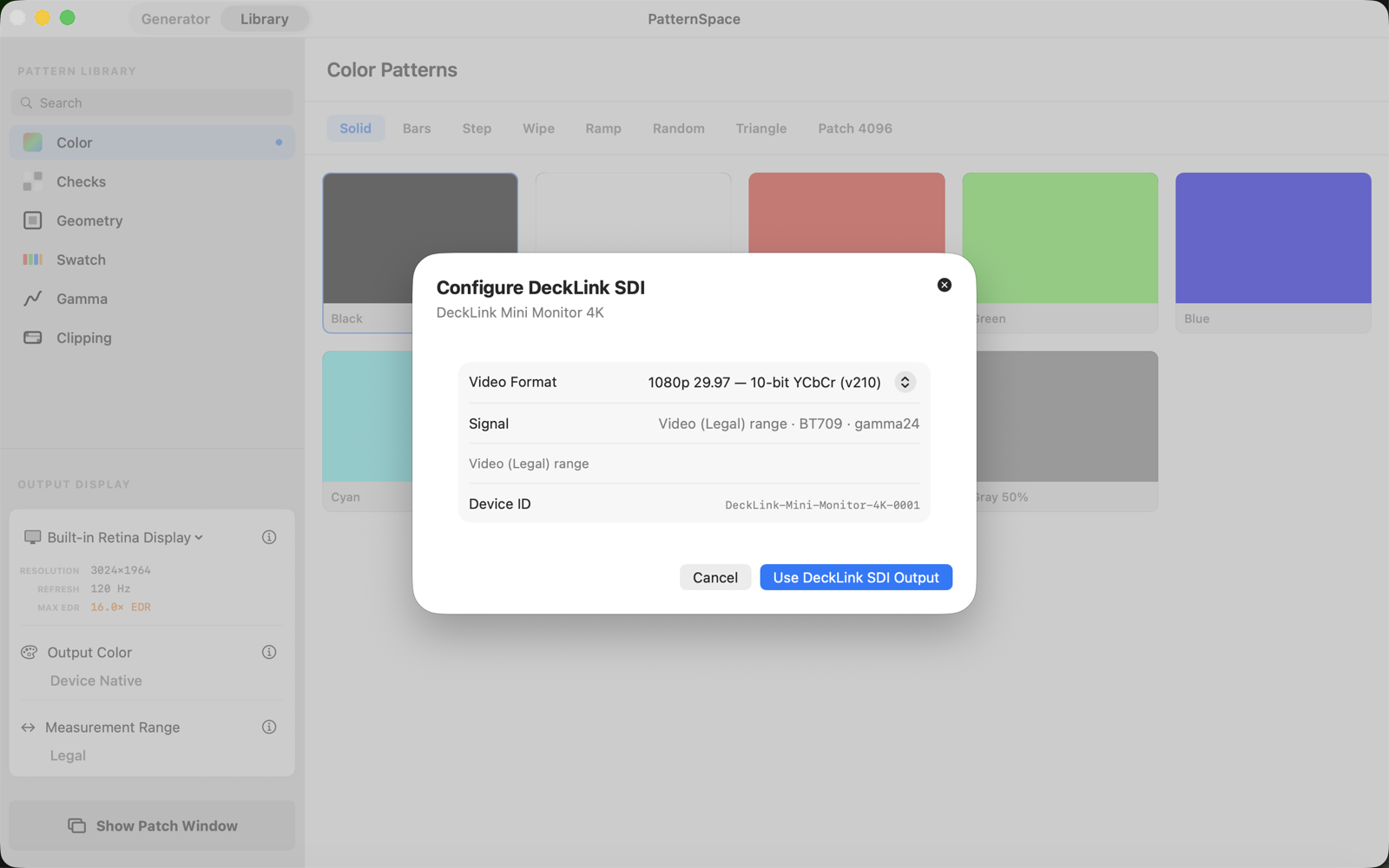
- Select the output. Choose your DeckLink device and a progressive SDR mode, then select Use DeckLink SDI Output. “Ready for first frame” means the route is armed and waiting for a patch.
- Connect ColourSpace. Start ColourSpace’s Network Server on the calibration computer. In PatternSpace, go to Generator, choose ColourSpace, and connect to the server’s IP address and port.
- Sanity-check the signal before profiling. Send black, white, neutral gray, and primary patches. Confirm the intended monitor receives them, that its input expects legal-range BT.709, and that the patch geometry suits your measurement instrument.
- Measure and verify. Run your ColourSpace patch sequence with the meter. Apply corrections in the appropriate downstream device or software, then verify with an independent measurement sequence.
One gotcha: SDI output is always Video (Legal) range. The Measurement Range control you’ve been using for Mac display output doesn’t change the SDI contract. Keep source interpretation and receiving equipment consistent — one stray range conversion elsewhere in the chain quietly shifts blacks and whites, and you’ll spend an afternoon blaming the meter.
Fail-safe by design: a calibration tool that refuses to lie
My favorite part of this feature isn’t the SDI output — it’s the paranoia around it. When you leave SDI mode, PatternSpace requests and confirms a black frame before stopping the card. A failed SDI operation never silently redirects calibration patches to a Mac display. And if a safe black frame can’t be confirmed (“output state unknown”), there’s a Recover SDI Output action before you’re allowed to change routes.
This is how a measurement tool should behave: it would rather refuse to work than show you the wrong thing. More software should be this suspicious of itself.
DeckLink SDI troubleshooting
DeckLink runtime unavailable: check your Desktop Video version — PatternSpace 2.0 wants the 16.4.x family. Confirm the hardware is visible in Desktop Video Setup, then relaunch PatternSpace.
No validated DeckLink devices found: the runtime is fine, but no attached device and mode passes the compatibility checks. An honest caveat from the guide: passing these checks is not a claim that every Blackmagic model has been independently certified. Verify your exact hardware, driver, receiving monitor, and selected mode before trusting a measurement session.
ColourSpace connects but the image is wrong: confirm both purchases are active, the intended SDI output is selected, and you’re sending a supported solid or rectangle patch. Check the receiving monitor’s input, range, and mode. The connection log distinguishes a rejected patch from a video-path problem — two very different faults.
Who should calibrate over SDI from a Mac?
Not everyone. If you calibrate Mac displays as Mac displays, the existing display output is your tool and you can stop reading. But if you’re characterizing an SDI chain — a reference monitor, a video village setup, anything where the signal path is the thing under test — this turns the Mac you already own into a DeckLink SDI pattern generator, with ColourSpace running the show over the network.
PatternSpace 1.x answered “what color is my Mac showing.” The 2.0 SDI output answers a harder question: “what color is actually coming down this cable.” Different question, different path — finally, the patches take the right road.